| .gitea/workflows | ||
| .github/workflows | ||
| .swiftpm/xcode/xcshareddata/xcschemes | ||
| MyPlayground.playground | ||
| Sources | ||
| Tests/SwiftChessCoreTests | ||
| .gitignore | ||
| .spi.yml | ||
| LICENSE.txt | ||
| Package.swift | ||
| README.md | ||

SwiftChessNeo
WIP: I am actively developing swift-chess-neo while writing iWatchChess for iOS/macOS
Fork of Sage by @nvzqz along with @SuperGeroy's patches. This fork adds SwiftUI views, and other QoL improvements. Due to some technical difficulties, I ended up copying the files in the Sources folder and adding them to my project.
Breaking Change (September 2025): The package now ships two distinct modules.
SwiftChessCoreis a platform-agnostic engine that builds on macOS, Linux, and Windows.SwiftChessUIdepends on the core target and contains the Apple-only playground/UIView helpers. Update your imports accordingly.
Usage
Game Management
Running a chess game can be as simple as setting up a loop.
import SwiftChessCore

let game = Game()

while !game.isFinished {
    let move = ...
    try game.execute(move: move)
}
Move Execution
Moves for a Game instance can be executed with execute(move:) and its unsafe
(yet faster) sibling, execute(uncheckedMove:).
The execute(uncheckedMove:) method assumes that the passed move is legal. It
should only be called if you absolutely know this is true. Such a case is when
using a move returned by availableMoves(). Otherwise use execute(move:),
which checks the legality of the passed move.
Move Generation
SwiftChessCore is capable of generating legal moves for the current player with full support for special moves such as en passant and castling.
-
availableMoves()will return all moves currently available. -
movesForPiece(at:)will return all moves for a piece at a square. -
movesBitboardForPiece(at:)will return aBitboardcontaining all of the squares a piece at a square can move to.
Move Validation
SwiftChessCore can also validate whether a move is legal with the isLegal(move:)
method for a Game state.
The execute(move:) family of methods calls this method, so it would be faster
to execute the move directly and catch any error from an illegal move.
Undo and Redo Moves
Move undo and redo operations are done with the undoMove() and redoMove()
methods. The undone or redone move is returned.
To just check what moves are to be undone or redone, the moveToUndo() and
moveToRedo() methods are available.
Promotion Handling
The execute(move:promotion:) method takes a closure that returns a promotion
piece kind. This allows for the app to prompt the user for a promotion piece or
perform any other operations before choosing a promotion piece kind.
try game.execute(move: move) {
    ...
    return .queen
}
The closure is only executed if the move is a pawn promotion. An error is thrown if the promotion piece kind cannot promote a pawn, such as with a king or pawn.
A piece kind can also be given without a closure. The default is a queen.
try game.execute(move: move, promotion: .queen)
Pretty Printing
The Board and Bitboard types both have an ascii property that can be used
to print a visual board.
let board = Board()

board.ascii
//   +-----------------+
// 8 | r n b q k b n r |
// 7 | p p p p p p p p |
// 6 | . . . . . . . . |
// 5 | . . . . . . . . |
// 4 | . . . . . . . . |
// 3 | . . . . . . . . |
// 2 | P P P P P P P P |
// 1 | R N B Q K B N R |
//   +-----------------+
//     a b c d e f g h

board.occupiedSpaces.ascii
//   +-----------------+
// 8 | 1 1 1 1 1 1 1 1 |
// 7 | 1 1 1 1 1 1 1 1 |
// 6 | . . . . . . . . |
// 5 | . . . . . . . . |
// 4 | . . . . . . . . |
// 3 | . . . . . . . . |
// 2 | 1 1 1 1 1 1 1 1 |
// 1 | 1 1 1 1 1 1 1 1 |
//   +-----------------+
//     a b c d e f g h
Forsyth–Edwards Notation
The Game.Position and Board types can both generate a FEN string.
let game = Game()

game.position.fen()
// rnbqkbnr/pppppppp/8/8/8/8/PPPPPPPP/RNBQKBNR w KQkq - 0 1

game.board.fen()
// rnbqkbnr/pppppppp/8/8/8/8/PPPPPPPP/RNBQKBNR
They can also be initialized from a FEN string.
assert(Board(fen: game.board.fen()) == game.board)

assert(Game.Position(fen: game.position.fen()) == game.position)
Iterating Through a Board
The Board type conforms to Sequence, making iterating through its spaces
seamless.
for space in Board() {
    if let piece = space.piece {
        print("\(piece) at \(space.square)")
    }
}
Squares to Moves
Sequence and Square have two methods that return an array of moves that go
from/to self to/from the parameter.
[.a1, .h3, .b5].moves(from: .b4)
// [b4 >>> a1, b4 >>> h3, b4 >>> b5]

[.c3, .d2, .f1].moves(to: .a6)
// [c3 >>> a6, d2 >>> a6, f1 >>> a6]

Square.d4.moves(from: [.c2, .f8, .h2])
// [c2 >>> d4, f8 >>> d4, h2 >>> d4]

Square.a4.moves(to: [.c3, .d4, .f6])
// [a4 >>> c3, a4 >>> d4, a4 >>> f6]
Playground Usage
Board Quick Look
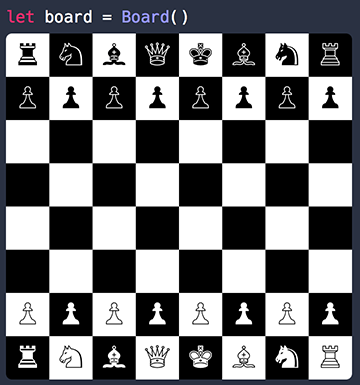
Board conforms to the CustomPlaygroundDisplayConvertible protocol when SwiftChessUI is imported on macOS/iOS/tvOS projects.
import SwiftChessCore
import SwiftChessUI // enables playground quick look helpers
SwiftUI BoardView
SwiftChessUI includes a native SwiftUI surface that mirrors the classic AppKit playground helpers while supporting modern gestures and animations. Compose a BoardView with an observed BoardState to render a live game:
import SwiftChessCore
import SwiftChessUI
import SwiftUI

struct AnalysisView: View {
    @StateObject private var boardState = BoardState()

    var body: some View {
        BoardView(state: boardState, theme: .classic)
            .frame(width: 320, height: 320)
            .onAppear {
                boardState.feedbackHandler = { feedback in
                    if feedback == .invalidMove {
                        print("Illegal move")
                    }
                }
            }
    }
}
BoardState reacts to taps and drag gestures, highlights legal moves, tracks the last move, and surfaces promotion requests. Customize colours, highlight palettes, and animation curves by passing a tailored BoardTheme.
Minimax Algorithm
You can use the bestMove(depth:) method to find the best move for the current player
import SwiftChessCore

let game = try! Game(position: Game.Position(fen: "8/5B2/k5p1/4rp2/8/8/PP6/1K3R2 w - - 0 1")!)

if let move = game.bestMove(depth: 3) {
    print("Best move: \(aiMove)")
// "Best move: f7 >>> g6"
    try game.execute(move: aiMove)
}
To-Do
- SwiftUI Views (In-Progress)
- UCI Chess Engine Support
- SVG Resources
- Move Handling
- Enhance PGN Parsing
- Comprehensive PGN Support
- Support for different lines
- GameplayKit Support
Possible Misc Enhancements
- Integrated Lichess Client (?)
- Player Database (?)
License
Original Notice:
Sage and its modifications are published under version 2.0 of the Apache License.